VM/ESA Greater N-way Thoughts
VM/ESA and VSE/ESA Technical Conference - October 1996
Bill Bitner
VM Performance Evaluation
IBM Corp.
1701 North St.
Endicott, NY 13760
(607) 752-6022
Internet: bitner@vnet.ibm.com
Expedite: USIB1E29 at IBMMAIL
Bitnet:
Home Page: http://www.vm.ibm.com/devpages/bitner/
(C) Copyright IBM Corporation 1996 - All Rights Reserved
Table of Contents
DISCLAIMER
Trademarks
Introduction
References
VM/ESA Multiprocessor Support
MP Factor
Single Processor Speed
Single non-MP Virtual Machine
Master Processor Usage
Another View of Master Processor
Virtual MP Support
VSE/ESA Turbo Dispatcher
Some VM/VSE Turbo Thoughts
9672 Sizings
Summary
DISCLAIMER
The information contained in this document has not been submitted to any formal IBM test and is distributed on an "As is" basis without any warranty either express or implied. The use of this information or the implementation of any of these techniques is a customer responsibility and depends on the customer's ability to evaluate and integrate them into the operational environment. While each item may have been reviewed by IBM for accuracy in a specific situation, there is no guarantee that the same or similar results will be obtained elsewhere. Customers attempting to adapt these techniques to their own environment do so at their own risk.
In this document, any references made to an IBM licensed program are not intended to state or imply that only IBM's licensed program may be used; any functionally equivalent program may be used instead.
Any performance data contained in this document was determined in a controlled environment and, therefore, the results which may be obtained in other operating environments may vary significantly.
Users of this document should verify the applicable data for their specific environment.
It is possible that this material may contain reference to, or information about, IBM products (machines and programs), programming, or services that are not announced in your country or not yet announced by IBM. Such references or information must not be construed to mean that IBM intends to announce such IBM products, programming, or services.
Should the speaker start getting too silly, IBM will deny any knowledge of his association with the corporation.
Trademarks
- The following are trademarks of the IBM corporation:
- IBM
- VM/ESA
- VSE/ESA
- MVS/ESA
- CICS
Introduction
- IBM CMOS Processors
- VSE/ESA multi-processor support
- VM/ESA support to run on large n-way
- VM/ESA support to provide virtual MP configuration
- Putting all the above together
- Objective is to provide information to
- Avoid customer performance critical situations
- Answer the "On what?" question to the answer "It depends."
References
- VSE/ESA Turbo Dispatcher Guide and Reference SC33-6599. Details on setting up, using, and measuring the Turbo Dispatcher.
- VM/ESA Performance Manual SC24-5782. Background on scheduling and tuning for VM/ESA.
- VM/ESA Version 2 Release 1.0 Performance Report GC24-5801. Contains some VSE/ESA guest measurements, including Turbo Dispatcher measurements.
- Large Systems Performance Reference SC28-1187. Processor sizing and capacity information.
- VM/VSE Performance Hints and Tips GC24-4260. General performance recommendations and information, not related to Turbo Dispatcher.
- Balanced Systems and Capacity Planning GG22-9299 some discussion of n-way. It is an older red book.
- VSE/ESA 2.1 Turbo Dispatcher Paper available from your IBM rep (TOOLS SENDTO BOEVM3 VMTOOLS IBMVSE GET VE21PERF PACKAGE
- See also IBM VSE/ESA home page at http://www.s390.ibm.com/vse/
- See also IBM's VM Operating System Home Page at http://www.vm.ibm.com/
Speaker Notes
Several key significant changes have people looking at environments that are new. Well, at least environments that are new to them. These technology improvements include hardware and software changes. IBM continues to exploit CMOS technology to provide better price performance processors. Also, on the software side, VSE/ESA shipped multiprocessor support in the Fall of 1995. This support, known as the Turbo Dispatcher, allows for greater efficiencies with n-way processors. These various changes have people asking where VM/ESA fits in. VM/ESA still has a major role to play. VM/ESA runs well on the new CMOS boxes and the virtual MP support of VM/ESA allows continued added benefit for VSE/ESA customers.
This presentation looks at the VM/ESA support of n-way processors and virtual multiprocessor configurations. With the various changes we mentioned, there are scenarios that can get customers into problem situations. My goal is to describe the key considerations to avoid critical situations. Those that know me sometimes get tired of me answering performance questions with it depends. They've started following up the questions with "On what does it depend?".
Typically I list references at the end of my presentations. However in this case, I believe it is very important that you do not end your research of this area with this presentation. While I will try to be thorough, there are a number of areas I just can not cover to the degree you may want. A number of the references are being periodically updated and I would recommend making sure you have the most recent.
Let me also take a second to thank some people: Wolfgang Kraemer, Wes Ernsberger, and Greg Kudamik (all of IBM) for their expertise in VSE and VM performance; Barton Robinson (Velocity Software) for making me think about some of these issues; Dean Stone (IBM) for his editorial comments on the presentation; and Romney White (Mirasoft) for his help in research.
VM/ESA Multiprocessor Support
- All releases of VM/ESA have supported n-way.
- Some minor changes along the way to accommodate a larger N
- Capacity considerations
- MP Factor
- Speed of the single processor
- Single Non-MP virtual machine
- Master Processor usage
Speaker Notes
VM/ESA has always had N-way support. There were some changes back in the VM/ESA 1.1.1 time frame where we added support for greater than 6-way support. We should be good up to a 14-way. A four-bit counter is used for the number of processors whose last-translated address corresponds to a particular frame. This allows values from zero through 15, but 15 would also result if a value of zero was decreased by one (in error), so only values 0 through 14 are legal. Hence, the limit is 14. When looking at n-way configurations, in particular moving to a large n-way from a smaller "N" of faster processors, there are a few items that should be considered. These are: the MP factor, the speed of a single processor in the complex, the requirements of single non-MP virtual machine applications, and master processor usage. We will look at each of these in greater detail in this presentation.
MP Factor
- Not a perfect world so an N-way does not provide N times the capacity.
Speaker Notes
If we built operating systems perfectly, an N-way would provide the capacity of single processor times N (or more). Unfortunately, we are not perfect. There is some overhead involved in managing the multiple processors. One consideration of running on N-ways is the MP factor, which is a measure of how much potential capacity is lost when we add processors. For example, assume a workload run on a 1-way can support 100 transactions per second, but when run on a 2-way supports 180 transactions per second. The MP factor is 180/(2*100) or 0.90. You can look at this as a 2-way provides 90% of the throughput of 2 one ways. The MP factor often depends on the workload and on N. For some systems, their design may lend themselves to running well on smaller N, but then suffer large system effects as N increases. Some systems may be designed such that the step from 1 to 2-way is significant but that N > 2 does not have much of an impact.
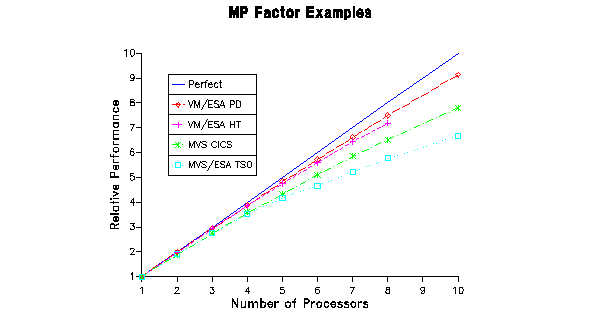
The graph above shows some examples of the MP effect for two workloads for both VM/ESA and MVS/ESA. It is interesting to note that even on the same operating system the MP factor differs depending on the workload. The workloads shown here are just examples with throughput normalized to 1 for a 1-way on all workloads. While I am biased towards VM/ESA and was selective about which workloads to plot, VM/ESA does tend to have a better MP factor than MVS. The data shown is taken from LSPR measurements. There was one MVS workload that did better than the 2 VM workloads; that was the floating point calculation workload which is really a different kind of beast.
You might be wondering why the VM/ESA HT workload stops at the 8-way. This is because at this point, the HT workload becomes constrained by the master processor limitation and not the general MP factor. We will address the master processor later.
Single Processor Speed
- Migrate to a large n-way from a smaller "N" of faster processors
- Equivalent throughput can be provided.
- Processor time is only a portion of total response time.
- Watch for secondary effects, such as increased storage requirements.
                         After
      Before
                      +----------+
    +----------+      |          |
    |          |      |   I/O    |
    |   I/O    |      |          |
    |          |      +----------+
    +----------+      |   CPU    |
    |  CPU     |      |          |
    +----------+      +----------+
Speaker Notes
It is interesting to hear people react to ideas such as moving from a 60 mip 2-way to a 60 mip 4-way. This would involve moving from 30 mip engines to 15 mip engines. Some people's immediate reaction is response time will double. Well this probably incorrect. Response time is typically made up of more than just processor time (execution and wait). Often the I/O component can be the largest piece of response time. So if it takes 50% longer for the processor component, that might not mean response time increases 50%.
On the other hand, I have also seen people ignore the fact that despite having equivalent capacity, it will take longer to execute the instructions of a single threaded application. I once explained this to a marketing type who did not like the idea of me saying that. He said, "But Bill, that's bad". "No", I replied, "That's the truth".
I could also describe scenarios where being able to run multiple virtual machines in parallel can help throughput. For example, there are scenarios where starting I/Os on multiple processors in parallel could benefit I/O intensive applications.
Another element to recognize is side effects. For example, if a transaction takes slightly longer because of a slower processor, the pages associated with the transaction will be required for a longer period of time. So there are scenarios where slower processors increase storage and paging requirements.
Single non-MP Virtual Machine
- Applications or server machines that are not MP capable are limited to 1/Nth of system resources.
- Some applications/servers can be split
- Some applications/servers can be duplicated
- Check high processor usage.
- Watch for peaks. Averages can be misleading.
Speaker Notes
A non-MP virtual machine is one that is not structured to exploit multiple virtual processors. In my introduction to performance presentations, I like to describe various system resources by looking at certain common attributes. One of these attributes is granularity. This applies to processor resources in that a single non-MP virtual machine is limited to 1/Nth of the system processor resources where N is the number of processors. This makes sense in that a virtual processor can only run on one real processor at a time.
Therefore, you want to make sure key applications are limited by the amount of processor resource that can be delivered by a single processor. Examine the top processor using server virtual machines and applications. Remember to look for peaks. A server may average only 9% of the system, but have peaks of 35%. If you only looked at the average, you might assume it could run on a 10-way without any problems. That would lead to an unpleasant surprise.
Master Processor Usage
- Master Processor
- One method VM uses to serialize work.
- Certain CP functions can only run on the master (spool, CP cmds).
- Along with raw capacity, queueing should be considered (Changes in VM/ESA 1.2.0 illustrated this).
- Bounding the amount of master time
- Worse Case = All non-emulation time on the Master.
- Best Case = All non-emulation time on Master minus the average non-emulation time on the alternate processors.
For example 4-way with current data:

  CPU   Total  User  Syst   Emul
   1     73     65     8     40          this is master
   2     70     65     5     50
   3     68     64     4     48
   4     71     66     5     51
- Worse Case = 11.7% of workload is master only
   Tot_CPU_Master - Emulation_Master       (73 - 40)
  -----------------------------------  =  -------------------- = .117
   All CPU on All Processors               (73 + 70 + 68 + 71)
- Best Case = 4.6% of workload is master only
 Tot_CPU_Master - Emulation_Master - AVG(Non_emulation_alternates)
 ------------------------------------------------------------------- =
      All CPU on All Processors


  73 - 40 - (20 + 20 + 20)/3        33 - 20
 -----------------------------  =  ----------  =  0.046
    73 + 70 + 68 + 71                 282
Speaker Notes
VM/ESA uses a variety of methods to serialize work and protect storage in a multiple processor environment. The master processor is just one of the methods. There is one and only one master processor on a VM/ESA system, with the other processors being referred to as alternate processors. The master is typically the processor on which you IPL the system unless that processor has a unique feature (e.g. vector or crypto). CP was designed such that certain CP functions can only run on the master processor. This includes parts of spool functions and CP command processing and other processing.
I use the method shown in these foils to bound the amount of master-only processor work in a system. The worse case assumes that all non-emulation processing on the master processor is master-only. The best case assumes that CP processing above the average CP processing for the alternate processors is master-only. The example shows a 4-way system with the master on processor number 1. Master-only time makes up between 4.6 and 11.7 percent of the workload. This implies that master-only capacity constraints would start to be a factor some time after an 8-way system.
Another View of Master Processor
- Monitor collects hi-frequency statistics on PLDV (Processor Local
dispatch vector)
- Running counter of sampled times when PLDV is not empty.
- Running counter of items on the PLDV.
- One PLDV for each processor plus an extra one on master for master-only work.
- Monitor counts sum of both for monitor data.
- Prior to VM/ESA 1.2.1 value on master was skewed high.
- User State Sampling - queuing on master can show up in any of
the following:
- Console function wait
- Instruction Simulation
- I/O Wait
Speaker Notes
Another place to get information on master processor usage is from processor dispatching statistics kept in the monitor. In particular the high frequency state sampling done of the Processor Local Dispatch Vector (PLDV). The PLDV is a short list of users ready to run. It was created for performance reasons. There is a separate PLDV for each processor plus a special PLDV for master-only work. That is, the master processor has two PLDVs: one for master-only work and the regular PLDV. Monitor state samples these PLDVs and records both the number of times the PLDV was found empty and the count of items on the list when non-empty. Note that for the master processor the numbers recorded are for the combined items on both PLDVs.
There is also a value reported in monitor called "moves to master", which some people like to track. The name is a bit misleading. It is actually a count of times we dispatch master-only work on the master processor. There is not a one-to-one correspondence to VM functions. Some master-only tasks are broken up to avoid hogging the master and therefore increase the moved to master count.
Virtual MP Support
- May define additional processors dynamically
- In user directory include - MACHINE ESA 2
- CP DEFINE CPU vcpu_addr
- Or put everything in the directory
- CPU 00 CPUID 012345 NODEDICATE
- CPU 01 CPUID 112345 NODEDICATE
- CPU 02 CPUID 212345 NODEDICATE
- Can have more virtual processors than real for testing
- CP commands of interest -
- QUERY VIRTUAL CPUS
- CPU cpu_addr cmd_line
- DEDICATE and UNDEDICATE
- Tuning
- Share setting is for virtual machine, therefore divided amongst all virtual processors
- Processors can be dedicated
- Mixing dedicated and shared virtual processors is not recommended
- Monitoring
- Monitor, Indicate, and RTM provide statistics for all virtual processors.
- Storage statistics are associated with the base virtual processor
- Watch for cases where normally the max is 100% but with virtual n-way max is now N*100%.
Speaker Notes
There are two approaches to creating a virtual MP machine. You can define the virtual processors in the directory so they are available when the virtual machine logs on. Or you can set up the directory so that you can use the DEFINE CPU command to add virtual processors dynamically. Note that detaching a virtual processor resets the virtual machine. Do not define extra virtual processors unless you are going to use them. Defined, but unused, virtual processors can cause performance problems.
From a tuning perspective, it is important to note that the share value is distributed across the virtual machine. For example, if you have a virtual 4-way and a default share of relative 100, then each virtual processor would be scheduled as if it had a relative 25 share value. Virtual processors can be dedicated to real processors. I do not recommend mixed environments where a single virtual machine has both dedicated and undedicated virtual processors. This can result in performance anomalies that will be difficult to detect and explain.
VSE/ESA Turbo Dispatcher
- Provides multi-processor support
- Can be enabled on uniprocessor
- Dispatching done at a partition level
- MP support breaks times down as
- Parallel
- Non-Parallel
- Spin
- Can view break down via TD Query command or other methods
- The amount of non-parallel code may be a limiting factor to MP exploitation
- Work of single partition bounded by a real processor
Some VM/VSE Turbo Thoughts
- Roll out in small steps
- Collect data
- Enable Turbo Dispatcher
- Collect data on non-parallel code
- Create virtual MP
- Double check share settings and/or dedicated processors
- Do not define more virtual processors than real processors (except for test)
- General recommendation - dedicate all the virtual processors or none of the virtual processors.
Speaker Notes
VSE/ESA MP support first went out as service in the Fall of 1995. Since then, additional enhancements have been made in the service stream. I purposely did not list APAR or PTF numbers here for fear of them becoming obsolete. Please use the normal service process to get the most current level. The VSE/ESA MP support is known as the Turbo Dispatcher.
It is easy to draw some comparisons between VSE/ESA and VM/ESA, but we must remember that they are different systems. VSE/ESA dispatching is at the partition level, which you can think of as mapping back to the virtual processor level in VM/ESA. So if you have a single partition that makes up 75% of the workload, then it can be constrained on a 2-way system where it can only get 50% of the resources.
With the addition of the Turbo Dispatcher, processor time is broken down into three categories: Parallel, Non-Parallel, and Spin time. Parallel is code that can run on multiple processors at the same time. Non-Parallel, also called serial or privileged code, can only run on a single processor at any given time. This is in ways analogous to VM/ESA's master processor time, except that any processor can run the VSE/ESA non-parallel code (just not at the same time). Therefore, the amount of non-parallel code can be a limiting factor. The TD (Turbo Dispatcher) can be enabled even on a uni-processor. This allows you to collect information on how much non-parallel time is in your workload. This is key information for sizing.
When making the move to MP, take it slow and document things thoroughly. Having before and after data can be critical to explaining unexpected results. Documentation should include data from both VM and VSE (include CICS statistics where reasonable).
9672 Sizings
- Do not rely on the cheat sheets floating around that give a single number for processor speed.
- Be careful in sizings for high end water cooled to new CMOS.
- Consider services offered by Washington System Center for capacity planning and modeling.
- Use LSPR data.
- Note data on VSE guests on VM is sparse for new CMOS.
- LSPR data is good for normal CMS interactive workloads.
- Also look at the LSPR MVS numbers to get a worse case scenario for risk management.
- VM/VSE and heavy database workloads have been found to track closer to the MVS workloads than CMS interactive workloads.
- When writing performance guarantees, be sure to thoroughly define "performance".
Summary
- Understand the maximum real processors that can be exploited
- Economies of scale must be balanced with limitations
- Do not define more virtual processors than real processors
- If using dedicated virtual processors, dedicate all or none
- Remember Share value is split amongst all virtual processors in virtual configuration
- Processor usage is one piece of the equation
- In VM/ESA consider single virtual machine and master processor usage.
- In VSE/ESA consider single partition and non-parallel processor usage
- The more partitions with concurrent work the greater the benefit from turbo dispatcher
- Take migrations one step at a time
Speaker Notes
This last two foils summarize some do's and do not's for sizing of the 9672 processors and migrations to greater N-way configurations. I have seen too many critical customer situations as a result of people sizing boxes on a cheat sheet that lists a single MIPs number. Consider the service offerings from Washington System Center and elsewhere for capacity sizing and modeling, especially for the high-end water cooled to new CMOS processors. Use LSPR data. We know it's light in the VSE guest area. The LSPR VM workloads are good for CMS interactive workloads. However, for guest and database applications look at the MVS workloads as well to get a lower bound on performance. We've recently also found this to be true for some OV/VM workloads as well. When writing up performance commitments, please take time to thoroughly define "performance" (response time, throughput, processor utilization?).
Recognize that their are limitations to N-way exploitation, and when those limits will be reached for the given workload. Always gather before and after data, as you make one change at a time.